
RateYourMusic Integration
Quick access to RateYourMusic album pages directly from Spotify.
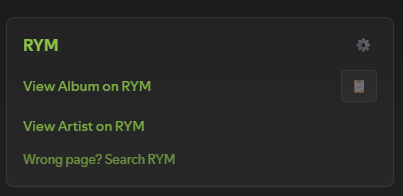
Features
Section titled “Features”- Direct Album Links: One-click access to RYM album pages
- Artist Links: Quick access to artist pages on RYM
- Smart Release Type Detection: Automatically detects albums, EPs, singles, mixtapes, and compilations
- Fallback Search: Quick search option if the direct link doesn’t work
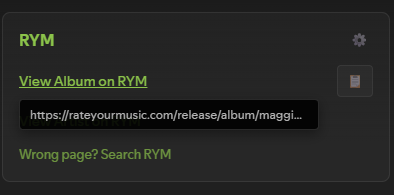
- URL Tooltips: Hover over links to preview the full URL before clicking
- Configurable Settings: Customize position, visible links, appearance, and more
- Copy to Clipboard: One-click copy button for album URLs
- Native Integration: Blends seamlessly with Spotify’s right sidebar UI
- Theme-Agnostic: Works with any Spicetify theme
- Lightweight: Minimal code, no external dependencies
How It Works
Section titled “How It Works”The extension intelligently determines the RYM release type using:
- Album name pattern detection (e.g., “mixtape”, “EP”, “compilation” in title)
- Spotify metadata analysis (
album_type+ track count) - Smart heuristics (e.g., 4-6 tracks → likely EP)
This generates accurate RYM URLs like:
/release/album/artist/album-name/for full albums/release/ep/artist/ep-name/for EPs/release/mixtape/artist/mixtape-name/for mixtapes/release/comp/artist/compilation-name/for compilations/release/single/artist/single-name/for singles
If the direct link doesn’t match (edge cases happen), use the fallback “Search RYM” link.
Installation
Section titled “Installation”Prerequisites
Section titled “Prerequisites”Spicetify must be installed and working.
-
Clone or download this repository:
Terminal window git clone https://github.com/yusufaf/spicetify-rym.git -
Copy the extension file to your Spicetify extensions folder:
Windows:
Terminal window copy spicetify-rym\rym-integration.js "%APPDATA%\spicetify\Extensions\rym-integration.js"macOS/Linux:
Terminal window cp spicetify-rym/rym-integration.js ~/.config/spicetify/Extensions/rym-integration.js -
Enable the extension:
Terminal window spicetify config extensions rym-integration.jsspicetify apply -
Reload Spotify - the RYM section will appear in the right sidebar
Once installed, the extension automatically displays RYM links in the right sidebar (where “About the artist”, “Credits”, etc. appear).
Links provided:
- “View Album on RYM” - Direct link to album page
- “View Artist on RYM” - Direct link to artist page
- “Wrong page? Search RYM” - Fallback search option
All links open in new tabs. Hover over any link to preview the URL.
Settings
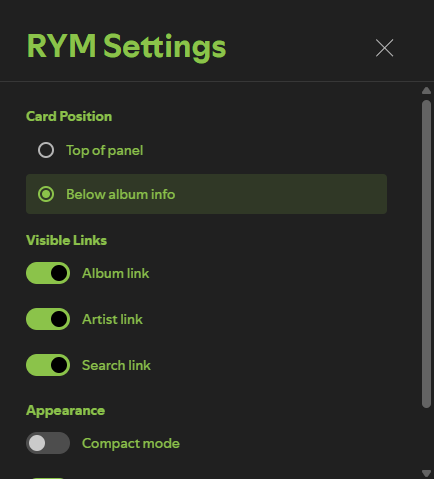
Section titled “Settings”Click the gear icon (⚙️) in the RYM card header to open settings.
Card Position:
- Top of panel
- Below album info (default)
Visible Links:
- Album link (on/off)
- Artist link (on/off)
- Search link (on/off)
Appearance:
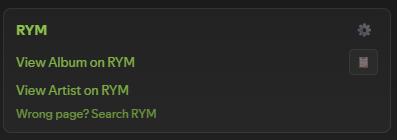
- Compact mode - Reduces padding and font sizes
- Show URL tooltips - Preview URLs on hover
Companion API (optional, blank by default):
- API base URL / API token - see below
- Show my captured rating and genres
Companion API (optional)
Section titled “Companion API (optional)”By default this extension makes no network requests of any kind. It builds RYM URLs from the album metadata Spotify already gave it and renders links. Nothing leaves your machine. If that is what you want, skip this section — the fields are blank out of the box and there is nothing to turn off.
Filling them in connects the extension to a companion API that you host yourself on AWS, which adds two things:
Links that actually resolve. RYM disambiguates releases with suffixes — Björk’s Homogenic lives at /homogenic-17/, Jay-Z’s The Blueprint at /the-blueprint.p/. Nothing in Spotify’s metadata can tell you that suffix exists, so no amount of slug logic will ever produce it. The only way to know a URL is right is for somebody to have landed on it. Once a page has been captured, the card links straight to it and shows a ✓.
Your own RYM data in the sidebar. Rating, rating count and genres for albums you have visited, captured by the companion userscript from pages you opened yourself.
What gets sent
Section titled “What gets sent”With the API configured, changing albums sends the 22-character Spotify album id to your server, with your bearer token. That is the whole request. No listening history, no timestamps, no track-level data.
Outgoing RYM links also gain ?src=spicetify&sid=<album id>, which is how the userscript ties a RYM page back to a Spotify album without guessing from names. The copy button still copies the clean URL.
Failure behaviour
Section titled “Failure behaviour”The card renders from local metadata first and is on screen before any request is sent. The lookup then upgrades it in place, or does not. A server that is down, slow, unreachable or misconfigured produces a console warning and the card you would have had anyway. Requests are abandoned after 4 seconds.
Data sharing
Section titled “Data sharing”Album-to-URL mappings are pooled across users of a shared deployment, because a link is factual and pooling is what makes 404s get fixed once rather than repeatedly. Ratings, genres and descriptors are private to whoever captured them and are never served to another user — enforced by the server’s key layout, not by a filter.
Screenshots
Section titled “Screenshots”| Settings | Tooltip | Compact Mode |
|---|---|---|
 |
 |
 |
Troubleshooting
Section titled “Troubleshooting”Extension not appearing:
- Verify file is in the correct Extensions directory
- Check
spicetify configshowsrym-integration.jsin extensions - Run
spicetify applyagain
Link goes to wrong page:
- RYM classifications don’t always match Spotify’s
- Use “Search RYM” fallback link
- Detection is ~70-80% accurate - edge cases expected
Console errors:
- Open DevTools (Ctrl+Shift+J / Cmd+Option+J)
- Look for “RYM Extension:” messages
- Ensure Spicetify is updated
Why No Scraping?
Section titled “Why No Scraping?”Earlier versions attempted to fetch RYM ratings and genres directly. That does not work, and it is not a matter of trying harder:
robots.txtisDisallow: /with an explicit prohibition on crawling- Requests from a residential IP with a normal browser User-Agent return 403
- An automation-driven real Chrome gets served a Cloudflare Turnstile challenge
- CORS blocks client-side fetching regardless
- Proxy rotation gets blocked too, and is circumvention rather than a fix
So the default build only ever builds links. The optional companion API does reach ratings and genres, but by a different route entirely: a userscript reads pages you opened in your logged-in browser. It sends nothing to rateyourmusic.com — no crawling, no prefetching, no link following. robots.txt governs robots, and there isn’t one.
Contributing
Section titled “Contributing”Contributions welcome! Areas for improvement:
- Better release type detection heuristics
- Support for edge cases (DJ mixes, bootlegs, video releases)
- Caching correct release types after user confirmation
- Context menu integration (right-click on albums/artists)
License
Section titled “License”MIT License - see LICENSE for details.
Acknowledgments
Section titled “Acknowledgments”- Built for Spicetify
- Links to RateYourMusic
- Inspired by the need to quickly check RYM while listening on Spotify
Independent project. Not affiliated with or endorsed by Spotify or Spicetify.