
Album Length
A Spicetify extension that surfaces the length of each track’s source album / EP inline in playlists, Liked Songs, and the Queue — so you can see at a glance how long the whole project is without clicking into the album.
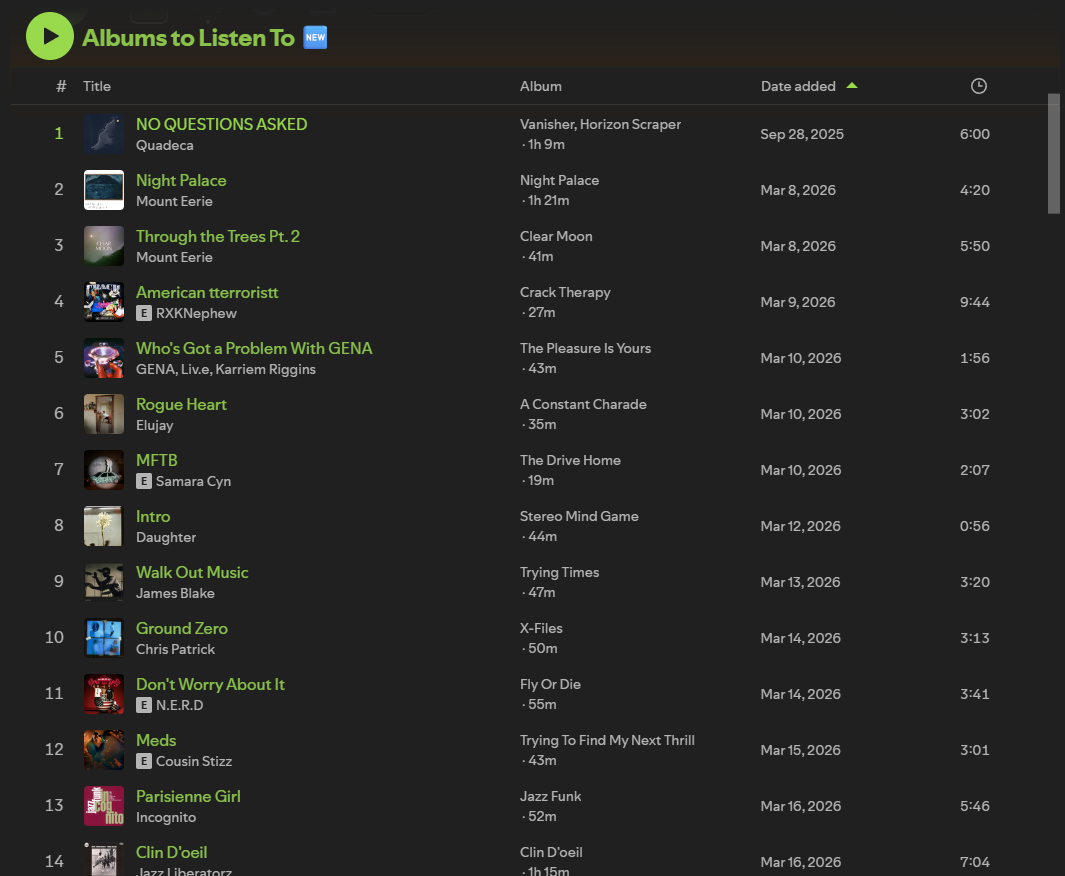
If you keep playlists made of tracks pulled from different albums and EPs, Spotify shows you the track duration but never the album duration. To know whether a song belongs to a 22-minute EP or a 70-minute LP, you have to click into the album. This extension shows that number where you can already see the album name.
Features
Section titled “Features”- Inline badge appended to the existing Album cell in tracklists (e.g.
Currents · 51m). - Works in Playlists, Liked Songs, and the Queue — toggle each surface independently.
- Format options:
42m/1h 23m,42:13,1 hour 23 minutes, or auto-hybrid. - Tooltip mode if you’d rather see the length on hover.
- Optional color-coding by album length, with customizable colors and tier boundaries.
- Singles auto-hidden — when a track is the album, the redundant badge is suppressed.
- Album durations are cached indefinitely (album lengths don’t change). Cache lives in
Spicetify.LocalStorage. - Settings live in the profile menu (top-right avatar dropdown → “Album Length”).
Install
Section titled “Install”Manual install:
- Copy
album-length.jsinto your Spicetify Extensions folder:- Windows:
%APPDATA%\spicetify\Extensions\album-length.js - macOS / Linux:
~/.config/spicetify/Extensions/album-length.js
- Windows:
- Enable it:
spicetify config extensions album-length.jsspicetify apply
Display modes
Section titled “Display modes”Inline (default) shows the length appended to the album name. Tooltip mode hides it until you hover the album cell.
| Tooltip on hover |
|---|
 |
Settings
Section titled “Settings”Open the Spotify profile dropdown (top-right) → Album Length.
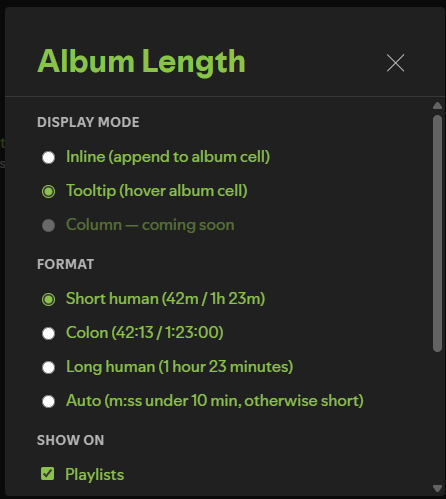
| Setting | Description |
|---|---|
| Display mode | Inline (default), Tooltip, or Column (coming soon) |
| Format | Short (1h 23m), Colon (1:23:00), Long (1 hour 23 minutes), Auto |
| Show on | Playlists / Liked Songs / Queue — toggle each |
| Hide singles | Suppresses the badge for 1-track “albums” (default on) |
| Color-code badges | Tints each badge by album length (off by default) |
| Badge colors | Per-tier color (swatch or #rrggbb) and the minute boundary between tiers |
| Clear cache | Forces a refetch of all album durations |
Badge colors
Section titled “Badge colors”With color-coding enabled, badges are tinted across four length tiers — by default green
under 30 min, yellow to 60 min, orange to 120 min, red beyond. Each tier’s color and the
boundary between tiers are editable: pick from the swatch or type a hex value (#rrggbb
or #rgb shorthand). Boundaries are kept in ascending order automatically, and Reset
colors & thresholds restores the defaults.
How it works
Section titled “How it works”Each tracklist row contains a link to the album it came from (/album/<id>). When the row is rendered, the extension extracts that id and fetches the album’s track list — first via Spicetify’s internal Cosmos endpoint (wg://album/v1/album-app/album/<id>/desktop), falling back to GraphQL (getAlbum) on newer Spotify builds where the legacy endpoint is gone. Track durations are summed and the total is persisted to Spicetify.LocalStorage indefinitely. A single MutationObserver on the main view container handles re-injection when Spotify re-renders rows.
License
Section titled “License”MIT — see LICENSE.
Independent project. Not affiliated with or endorsed by Spotify or Spicetify.