
Local Files+
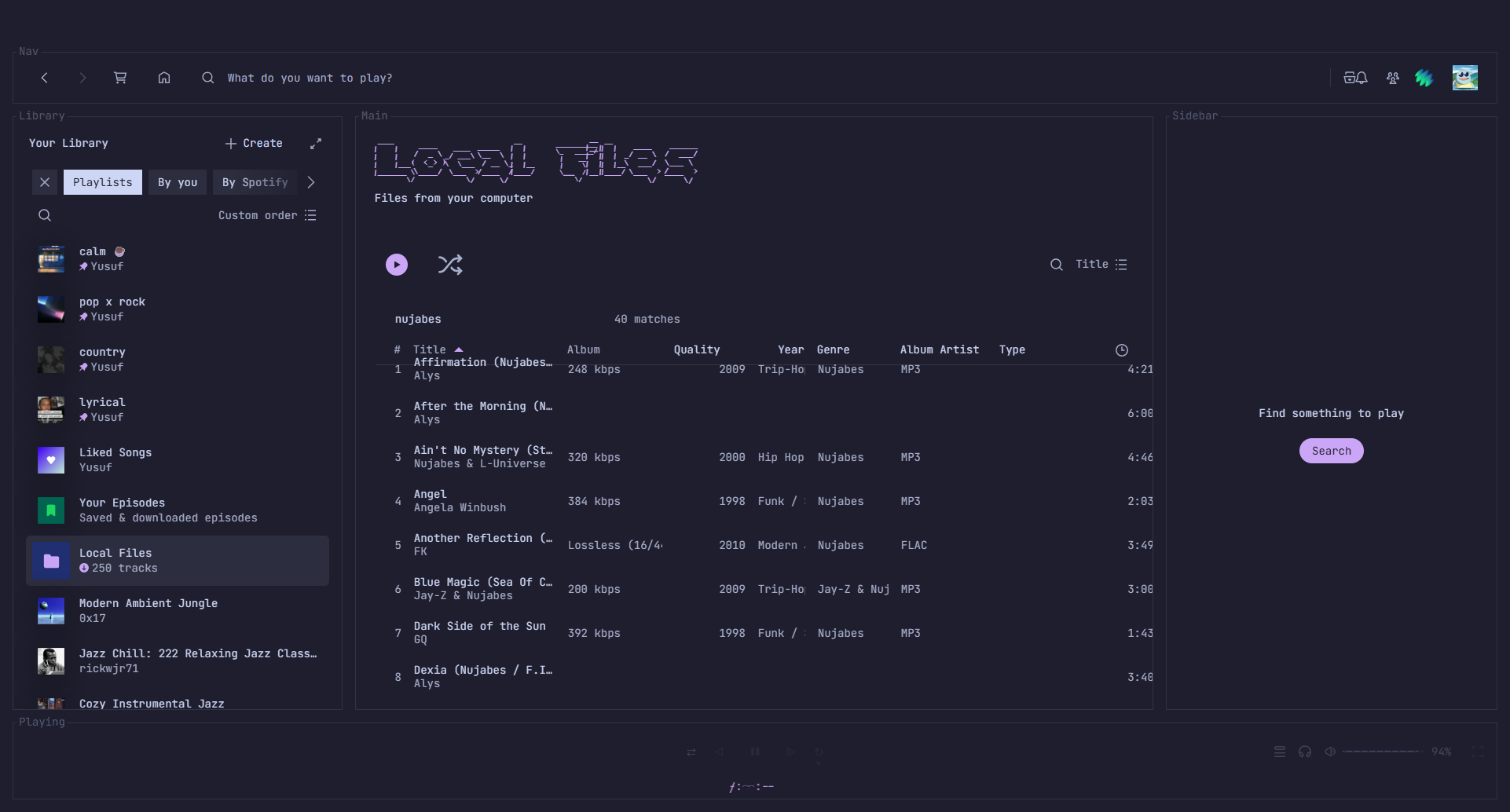
A Spicetify extension that reads the real tag metadata off your local audio files — artist, album artist, year, genre, bitrate/quality, and more — and adds it back into Spotify’s Local Files page as sortable, filterable columns.
Spotify’s own Local Files view only shows a handful of columns, and its column picker offers exactly two toggles: Album and Duration. Everything else — album artist, year, genre, real bitrate, file type, folder — already lives in your files’ tags. Local Files+ reads it and puts it back.
Features
Section titled “Features”- Extra columns: Quality (bitrate/lossless), Year, Genre, Album Artist, Artist, Type, Size, Date Modified, # (track number), BPM, Folder — toggle any of them on/off from Spotify’s own “Change visible columns” popover.
- Quality: lossy files show an average bitrate worked out from file size and length (embedded cover art counts toward the size); FLAC, ALAC and WAV show Lossless, with bit depth and sample rate for FLAC.
- Missing-tag marker — a small ⚠ next to any track missing album, artist, or track number, so you can spot what still needs tagging.
- Sort by any extra column — click its header.
- Filter, e.g.
flac year:2019 genre:jazz,lossless,bitrate:>256(256 or more),missing:album,folder:Nujabes.
How it works
Section titled “How it works”Local Files+ asks for one-time read access to your music folder via the browser’s File System Access API — no install, no background process, nothing leaves your machine. It walks the folder, parses ID3v2 (MP3), Vorbis comments (FLAC), and MP4 atoms (M4A) directly from the file bytes, caches the result, and matches each parsed file back to the track Spotify already knows about: by path where Spotify exposes one, otherwise by title tag or file name.
Install
Section titled “Install”Requires Spicetify, installed and applied at least once. The Marketplace route also needs the Spicetify Marketplace custom app.
From Spicetify Marketplace
Section titled “From Spicetify Marketplace”- In Spotify, open Marketplace (the shopping-cart icon at the top left) and stay on the Extensions tab.
- Search for
Local Files+. If it doesn’t show up, click Load more (» at the bottom of the list) until it does. Marketplace loads extensions in batches and only searches the ones it has loaded. - Hover the Local Files+ card, click its download button, then click Reload now.
Manually
Section titled “Manually”-
Download
local-files-plus.js(right-click → Save link as…) into your SpicetifyExtensionsfolder:- Windows:
%APPDATA%\spicetify\Extensions - macOS / Linux:
~/.config/spicetify/Extensions
- Windows:
-
Enable it and apply:
Terminal window spicetify config extensions local-files-plus.jsspicetify apply
Open Local Files+ settings from the profile menu, or from the Local Files+ settings button above the Local Files track list, then Choose music folder and pick the same folder Spotify uses for Local Files. (On Spotify 1.3.5 the profile-menu entry doesn’t render, so use the button.) The first scan parses every audio file in it; later scans only re-parse files that changed.
Supported formats
Section titled “Supported formats”Tags are parsed from .mp3 (ID3v2.2/2.3/2.4, falling back to ID3v1), .flac
(Vorbis comments + STREAMINFO for sample rate/bit depth), and .m4a/.mp4 (MP4
atoms; ALAC is detected as lossless). .aac tags are read when the file carries an
ID3 tag. .ogg, .oga, .opus, .wav and .wma are indexed (size, type) but their
tags aren’t read yet.
Development
Section titled “Development”No build step — local-files-plus.js is the whole extension.
pnpm test # syntax check, then the parser and matching tests in test/pnpm install # installs husky hooksThe tag parsers are pure functions (ArrayBuffer in, plain objects out) and run
identically under Node, so they’re testable without Spotify — see the
module.exports guard at the bottom of the file.
License
Section titled “License”MIT
Independent project. Not affiliated with or endorsed by Spotify or Spicetify.